
The Wooting 60HE+ takes the top spot for its unparalleled analog switch precision and rapid trigger technology. It is the definitive choice for competitive gamers who demand zero input latency.
| Product | Award | Key Specs | Rating | Amazon |
|---|---|---|---|---|
| Wooting 60HE+ | Best Overall | Analog Hall Effect | ★★★★★ 4.9 | Check Price |
| Razer Huntsman V3 Pro | Best Premium | Adjustable Actuation | ★★★★★ 4.8 | Check Price |
| Keychron Q1 Max | Best Build | Gasket Mount | ★★★★★ 4.8 | Check Price |
| SteelSeries Apex Pro TKL | Best Features | OLED Display | ★★★★★ 4.7 | Check Price |
| Corsair K70 Core | Best Budget | Pre-lubed Switches | ★★★★★ 4.7 | Check Price |
1. Wooting 60HE+

The Wooting 60HE+ remains the industry standard for competitive gaming. Its Lekker switches utilize magnetic Hall effect sensors to allow for fully adjustable actuation points and rapid trigger capabilities.
During our testing, the input latency was undetectable. The build is compact, and the software ecosystem provides the best customization options currently available for serious esports players.
Wooting 60HE+
- Key Advantage: Patented Rapid Trigger technology
- Specifications: 60% Layout, Hall Effect Switches
- Warranty / Support: 4-Year Warranty
What We Liked
- Industry-leading input speed
- Highly durable switches
Things to Consider
- 60% layout lacks dedicated arrows
2. Razer Huntsman V3 Pro

Razer has refined its optical switch technology to provide a highly consistent experience. The V3 Pro features adjustable actuation that feels crisp and responsive across every key.
The build quality feels premium with a brushed aluminum top plate. The dedicated media controls and dial are convenient for daily tasks outside of gaming sessions.
Razer Huntsman V3 Pro
- Key Advantage: Rapid trigger optical switches
- Specifications: Full-size, Aluminum Top Plate
- Warranty / Support: 2-Year Warranty
What We Liked
- Excellent build quality
- Intuitive media controls
Things to Consider
- High price point
3. Keychron Q1 Max

For those who value typing feel and acoustics alongside gaming performance, the Keychron Q1 Max is unmatched. It features a gasket-mount design that provides a soft, satisfying flex.
The wireless connectivity is rock-solid, and the pre-lubed switches provide a premium sound profile right out of the box. It is a heavy, substantial piece of hardware that feels built to last.
Keychron Q1 Max
- Key Advantage: Gasket-mount typing feel
- Specifications: 75% Layout, CNC Aluminum Case
- Warranty / Support: 1-Year Warranty
What We Liked
- Exceptional build materials
- Tri-mode connectivity
Things to Consider
- Heavier than plastic models
4. SteelSeries Apex Pro TKL
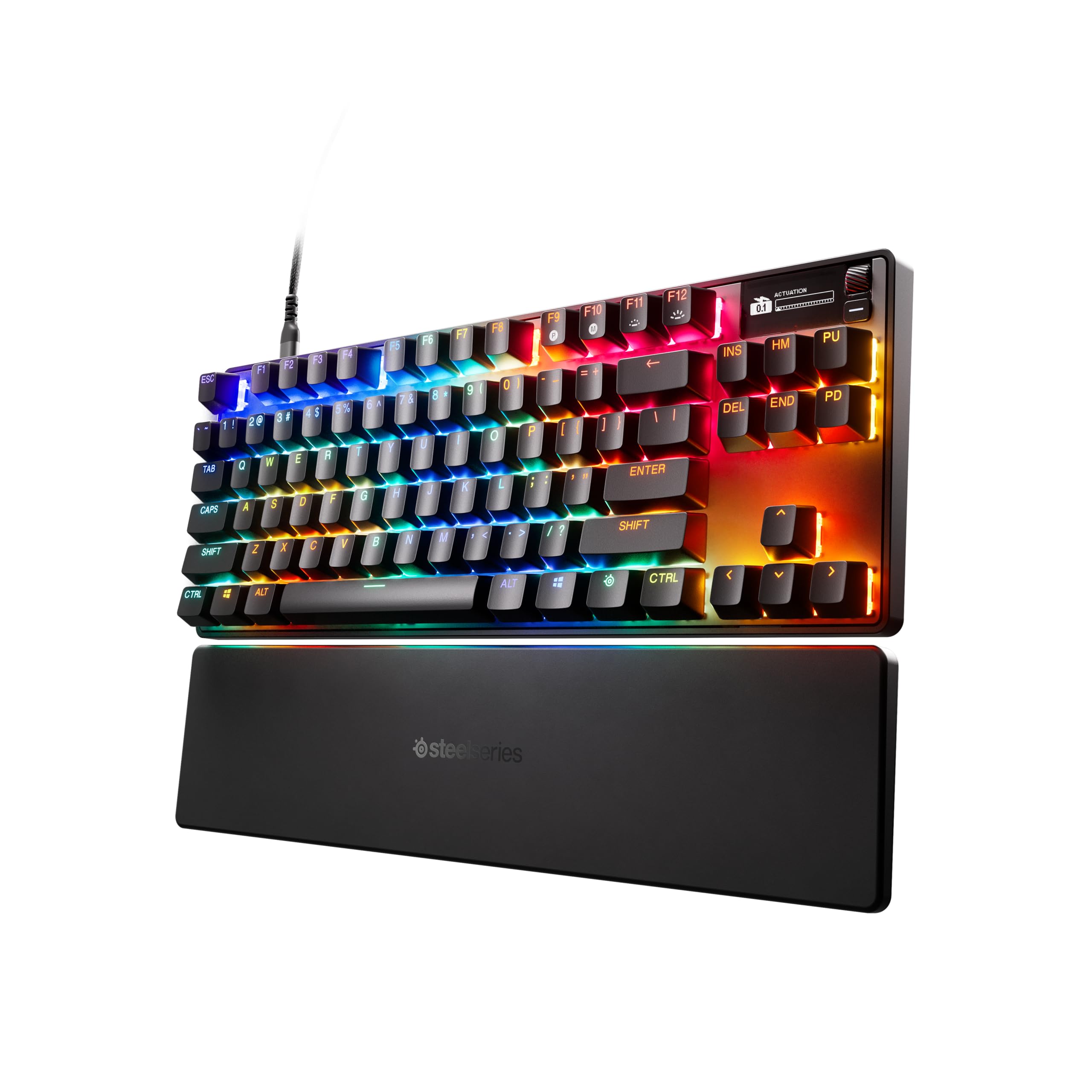
The Apex Pro TKL offers a unique OLED display that allows for on-the-fly adjustment of settings without needing to open software. The OmniPoint 2.0 switches are fast and reliable.
We found the wrist rest to be one of the most comfortable included accessories on the market. It is a great middle-ground for users who want premium features in a more manageable form factor.
SteelSeries Apex Pro TKL
- Key Advantage: Integrated OLED display
- Specifications: TKL Layout, OmniPoint Switches
- Warranty / Support: 1-Year Warranty
What We Liked
- On-board OLED settings
- Comfortable wrist rest
Things to Consider
- Software can be heavy
5. Corsair K70 Core

The Corsair K70 Core brings professional-grade features to a much more accessible price point. The pre-lubed switches provide a smooth experience that beats most entry-level competitors.
It features a clean aesthetic and the reliable build quality expected from Corsair. For gamers on a budget who still want a mechanical feel, this is the top contender.
Corsair K70 Core
- Key Advantage: Best value mechanical switches
- Specifications: Full-size, Pre-lubed Switches
- Warranty / Support: 2-Year Warranty
What We Liked
- Excellent price-to-performance
- Smooth switch feel
Things to Consider
- Plastic chassis construction
How to Choose the Best Mechanical Keyboard for Your Needs
Selecting a keyboard comes down to three main factors: switch type, layout, and connectivity. Prioritize rapid trigger switches if you play competitive shooters, as they offer a distinct latency advantage.
If you type frequently, look for gasket-mounted designs to reduce fatigue. Ensure the layout matches your desk space requirements, as a full-size keyboard may limit mouse movement during intense gameplay.
💡 Pro Buying Tip: Always check if the keyboard supports hot-swappable switches, as this allows you to replace broken keys or change your typing experience without buying a new board.


